
Stop Wasting Time on Unqualified Leads (Why Filters Aren't Enough?)
BLOG · IDEAL CLIENT PROFILE · B2B DATA STRATEGY
Est. read time: 10 min · Last updated: May, 2026
Your sales team is burning through 60% of their outbound time on leads that will never convert. It's not because your messaging is weak or your product isn't a fit; it's because your targeting is fundamentally blind.
According to a 2024 study by TOPO Research, sales development representatives spend an average of 15 hours per week researching and reaching out to prospects who never respond. The culprit? Most teams rely on demographic filters: company size, industry and job title to define their Ideal Customer Profile (ICP). Two companies might look identical on paper: same revenue band, same industry, same number of employees. But one is actively evaluating solutions like yours while the other just renewed a three-year contract with your competitor.
The difference isn't in the demographics. It's in the context. And if you're still building lead lists with filters alone, you're leaving qualified buyers on the table while chasing prospects who were never in-market to begin with.
The Filter Trap: Why Demographics Alone Miss the Mark?
Most B2B go-to-market teams start with the same playbook: build an ICP based on firmographics. Company revenue between $10M-$50M. Tech industry. 50-200 employees. VP of Sales or Head of Revenue Ops. Load those filters into your database, export a list, and start sending emails.
It's clean. It's repeatable. And it fails more often than it works.
Here's why: demographics tell you who someone is, not when they're ready to buy or why they'd care about your solution. A 2023 Gartner report found that only 17% of B2B buyers are actively in-market at any given time. That means 83% of your filtered list, however well-targeted, consists of people who aren't currently evaluating solutions.
Real-World Example: The Tale of Two SaaS Companies
Consider two mid-market SaaS companies, both targeting sales intelligence platforms:
- Company A: $25M ARR, 120 employees, Series B funded, VP Sales with five years tenure. On paper, a perfect fit.
- Company B: $30M ARR, 150 employees, Series B funded, VP Sales with four years tenure. Also, a perfect demographic match.
But context reveals a different story:
- Company A just posted three SDR job openings on LinkedIn. Their CRO tweeted last month about missing Q3 targets. Their tech stack shows they're using a free-tier prospecting tool. Signal: they're actively looking to scale outbound and likely evaluating better infrastructure.
- Company B signed a press release six months ago announcing a partnership with ZoomInfo. No recent hiring. Their leadership is posting content about retention, not acquisition. Signal: they're locked into an existing vendor and unlikely to switch anytime soon.
A filter-based approach treats both companies identically. A context-aware approach prioritises Company A and deprioritises Company B. According to research from SiriusDecisions, sales reps who incorporate behavioural and intent signals into their targeting see reply rates 2.3x higher than those relying on demographics alone.
Why Filters Fail?: The Three Gaps
- The Timing Gap: Filters can't tell you when a prospect is in-market. A company that fits your ICP perfectly might have just renewed their contract, consolidated vendors, or paused all new tool evaluations. You're reaching out at the wrong time, no matter how good your pitch is.
- The Intent Gap: Demographics describe static attributes. They don't capture buying signals, hiring freezes, leadership changes, tech stack migrations, or public complaints about current solutions. A VP of Sales at a $50M company could be thrilled with their current setup or desperately hunting for alternatives. The filter sees both the same way.
- The Pain Gap: Not every company in your target segment has the problem you solve. A sales intelligence platform might be critical for a company scaling outbound aggressively, but irrelevant for one focused entirely on inbound and referrals. Filters can't distinguish between the two.
The result? Sales teams waste hours per week on prospects who look perfect on paper but were never going to engage. According to InsideSales.com, the average SDR makes 52 calls to reach a single prospect. When those prospects aren't actually in-market, that effort compounds into wasted time at scale.
What Context Actually Means? (And Why It Matters?)
Context-aware ICP isn't just a buzzword; it's a fundamental shift from asking,
"who matches our criteria?" to "who is showing signals they need us right now?"
While demographic filters create a static snapshot, context layers in dynamic signals indicate readiness, intent, and urgency. This is where tools like RELUMIT's context-aware engine come into play, automatically surfacing these signals so sales teams can focus on prospects who are actually in-market.
The Three Pillars of Context-Aware Targeting
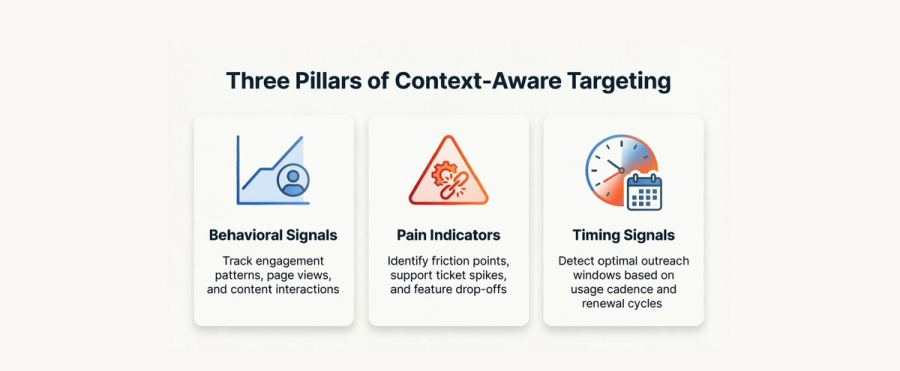
1. Behavioural Signals
What They're Doing: Behavioural signals reveal how a company is evolving. These aren't hidden, they're public, trackable actions that indicate internal priorities:
- Hiring activity: A company posting multiple SDR or BDR roles signals they're scaling outbound. A new VP of Sales or CRO hire often triggers tool evaluations within 90 days.
- Tech stack changes: Switching CRM platforms, adding marketing automation, or adopting new sales enablement tools indicate openness to change and active evaluation cycles.
- Funding events: Companies that raise Series A or B often allocate budget to sales infrastructure within six months. According to Crunchbase data, 68% of newly funded startups expand their go-to-market tooling within the first funding quarter.
- Content engagement: When decision-makers from a target company download whitepapers, attend webinars, or engage with thought leadership on specific topics, they're researching solutions.
A 2024 study by Forrester Research found that companies exhibiting three or more behavioural signals were 4.2x more likely to convert than those showing none.
2. Pain Indicators
What They're Struggling With: Pain indicators are public signs of internal challenges, the kinds of problems your solution solves:
- Social media complaints: When a VP of Sales tweets about frustration with data quality or response rates, they're signalling an active pain point.
- G2/Capterra reviews: Negative reviews of a competitor's product, especially recent ones, indicate dissatisfaction and potential openness to switching.
- Job postings: A job description mentioning "experience with [competitor tool]" or "building outbound from scratch" tells you exactly what they're trying to solve.
- Earnings calls and public statements: For larger companies, quarterly earnings transcripts often reveal strategic shifts, such as mentions of "improving sales efficiency" or "investing in pipeline generation", which are direct signals.
These aren't speculative; they're documented frustrations. TOPO's research shows that outreach mentioning a specific pain point the prospect has publicly expressed generates 41% higher reply rates than generic value propositions.
3. Timing Signals
When They're Ready to Buy: Timing is often the difference between a qualified lead and a waste of time. Context-aware targeting identifies when a company is likely in an active buying window:
- Contract renewal cycles: Most B2B tools operate on annual contracts. If you know a prospect signed with a competitor 11 months ago, they're approaching renewal, a natural re-evaluation point.
- Fiscal calendars: Many companies front-load budget approvals in Q1 and Q4. Timing outreach to align with budget-planning windows increases the likelihood of conversions.
- Leadership transitions: New executives often conduct tool audits within their first 90 days. A recent C-level hire in your target function is a high-intent signal.
- Growth milestones: Crossing revenue thresholds (e.g., $10M to $25M ARR) or headcount milestones often trigger infrastructure upgrades. Companies scaling rapidly need new tools to support that growth.
According to a study by SalesLoft, emails sent during identified "trigger events" (like leadership changes or funding rounds) reported 2.7x higher open rates and 3.1x higher reply rates than baseline outreach.
The Context-Aware ICP Framework: From Theory to Practice
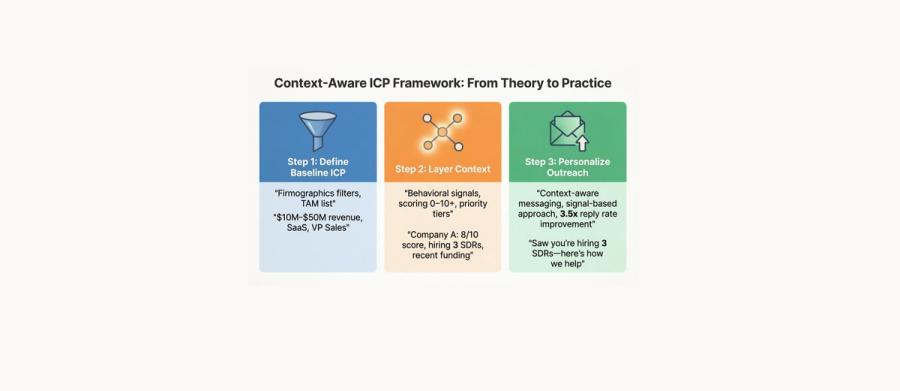
Building a context-aware ICP doesn't mean abandoning demographics—it means layering context on top of them. Think of firmographics as your baseline filter ("who could theoretically use our product?") and context as your prioritisation layer ("who should we reach out to first?").
Step 1: Define Your Baseline ICP (Firmographics)
Start with traditional filters. These create your total addressable market:
- Company size (revenue or headcount range)
- Industry or vertical
- Geography (if relevant)
- Key decision-maker roles (title, function)
- Tech stack (if your product integrates or replaces specific tools)
This gives you a list of companies that could buy. But it's still too broad to act on efficiently.
Step 2: Layer Context (Prioritisation, Not Guesswork)
In theory, scoring accounts by context sounds simple. In practice? Tracking hiring signals across LinkedIn, monitoring tech stack changes, cross-referencing funding data, and weighing signal freshness in real-time requires juggling 5+ tools and hours per week per rep. That's why most teams default to filters. They're easy, even if they're ineffective.
High-performing teams prioritise accounts showing signals like:
- Recent funding or growth milestones indicate budget availability and expansion mode
- Active hiring in target roles signals scaling intent and tool evaluation windows
- Leadership transitions, new executives often audit tools within 90 days
- Public pain indicators, such as social mentions, reviews, or job posts, reveal friction with current solutions
The exact weighting of these signals depends on your ICP, sales cycle, and product category. RELUMIT's engine evaluates multiple contextual dimensions using proprietary scoring logic that adapts based on win/loss data so the system gets smarter about what actually predicts conversion for your business.
Why does this matter?
Manual context tracking doesn't scale past a few dozen accounts. Automation isn't a luxury; it's the difference between spending time on research versus conversations.
Step 3: Personalise Outreach Based on Context
Generic outreach kills response rates. Once you've identified high-priority accounts, reference the specific signals that qualified them:
Generic: "Hi [Name], I noticed your company is in the B2B SaaS space. We help companies like yours improve sales efficiency. Interested in learning more?"
Context-aware: "Hi [Name], I saw you just opened three SDR roles. Congrats on the expansion! I'm reaching out because we help scaling sales teams enrich lead data and automate personalised outreach, which typically becomes critical at your stage. Would it be worth a quick call to explore how we're helping companies like [relevant customer] onboard new reps faster?"
The second message demonstrates awareness of their current situation, offers relevant value tied to that situation, and includes social proof. According to Outreach.io's 2024 benchmarking data, personalised emails referencing specific context see 3.5x higher reply rates than generic templates.
Want to See Context-Aware Scoring in Action?
Building context-aware ICP profiles manually is powerful, but it doesn't scale. RELUMIT automates the entire workflow: enriching lead data, detecting buying signals, scoring accounts in real-time, and generating personalised outreach that references the exact context that qualifies them.
If you're ready to stop chasing cold leads and start focusing on prospects who are actually in-market, join the RELUMIT waitlist. Early access members get first access to the context engine, priority onboarding, and exclusive pricing.
Join the waitlist: relumit.ordinexautomation.com
How to Implement Context-Aware ICP in Your Workflow?
Adopting a context-aware approach doesn't require ripping out your existing stack. It's an evolution, not a replacement.
For Teams Just Getting Started
If you're currently relying entirely on filters, start by manually adding one contextual layer:
- Pick one signal to track manually: For example, monitor LinkedIn for companies posting relevant job openings. Dedicate 30 minutes per week to this research.
- Build a simple scoring system: Use a spreadsheet to assign points to accounts showing your chosen signal. Prioritise outreach to the top 20%.
- Test personalised messaging: For high-scoring accounts, reference the signal in your outreach. Measure reply rates compared to your baseline.
This manual approach is time-intensive but proves the concept before investing in automation.
For Teams Ready to Scale
Once you've validated that context improves performance, automation becomes essential. Manual research doesn't scale past a few dozen accounts:
- Data enrichment platforms: Tools like Clearbit, ZoomInfo, or Apollo provide firmographic data and some behavioural signals (funding, tech stack).
- Intent data providers: Platforms like Bombora or 6sense track content consumption signals across the web to identify accounts researching specific topics.
- Context-aware engines: Solutions like RELUMIT go a step further, combining enrichment, intent data, and custom scoring into a single workflow. Instead of juggling multiple tools, you upload a list, and the platform automatically surfaces which leads are showing high-intent signals, why, and what messaging angle to use.
The key differentiator is automation of the entire workflow: data enrichment, signal detection, scoring, and even drafting personalised outreach. For SMBs especially, this removes the barrier of needing dedicated researchers or expensive data stacks.
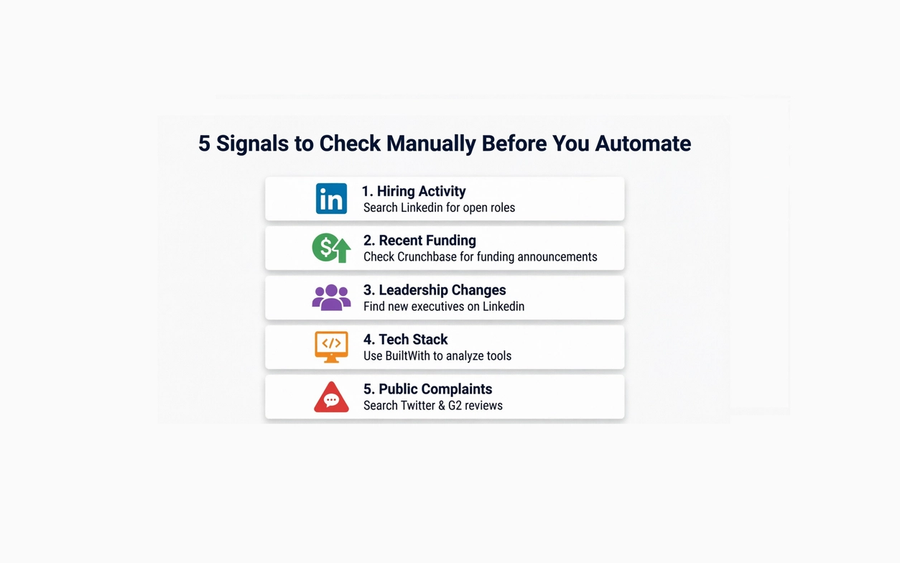
Five Signals to Check Manually (Before You Automate)
If you want to validate context-aware targeting before committing to tools, manually check these five signals for your next 20 prospects:
- Hiring activity: Search "[Company Name] + hiring + [relevant role]" on LinkedIn. Are they actively scaling your target function?
- Recent funding: Check Crunchbase for funding announcements in the last 12 months.
- Leadership changes: Use LinkedIn to see if a new VP, Director, or C-level exec joined in the last quarter.
- Tech stack: Tools like BuiltWith or Datanyze reveal which software the company is using. Do they have competitors or adjacent tools installed?
- Public complaints: Search Twitter/X and G2 reviews for recent mentions of pain points your product solves.
Track how many of your 20 prospects show at least one signal. If it's fewer than five, your baseline ICP filter might be too broad. If 15+ show signals, you're targeting the right companies, but you just need to prioritise them better.
The Bottom Line: Context Beats Guesswork
Demographic filters will always have a place in building your addressable market. But relying on them alone means treating all prospects the same—ignoring timing, intent, and pain. The result is wasted outreach, burned leads, and sales teams spending 60% of their time on prospects who were never in-market to begin with.
Context-aware ICP frameworks solve this by answering the question filters can't: Who is ready to buy right now?
The companies already seeing results from this shift aren't relying on intuition; they're tracking signals, scoring accounts systematically, and personalising outreach based on context. And increasingly, they're automating the heavy lifting so their teams can focus on conversations, not research.
Ready to Stop Wasting Time?
Building context-aware ICP profiles manually is powerful, but it doesn't scale. RELUMIT automates the entire workflow: enriching lead data, detecting buying signals, scoring accounts in real-time, and generating personalised outreach that references the exact context that qualifies them.
If you're ready to stop chasing cold leads and start focusing on prospects who are actually in-market, join the RELUMIT waitlist. We're launching soon, and early access users will get first access to the context engine, priority onboarding, and exclusive pricing.
Join the waitlist: relumit.ordinexautomation.com